Most apps in the App Store only have English screenshots. If your app is one of them, you're leaving downloads on the table in every non-English market.
Localizing your App Store screenshots is one of the highest-ROI things you can do for your app's growth. This guide covers why it matters, which languages to prioritize, how to do it efficiently, and common mistakes to avoid.
Why localized screenshots increase downloads
When a user in Germany, Japan, or Brazil opens your App Store listing, they make a split-second decision based on what they see. If your screenshots are in English and theirs is a non-English market, two things happen:
- They can't immediately understand your app's value. Even if they speak some English, processing a foreign language takes more cognitive effort. More effort means more friction. More friction means fewer downloads.
- Your app feels foreign. Apps with localized screenshots feel like they were made for that market. Apps with English-only screenshots feel like an afterthought.
Apple has confirmed that apps with localized metadata see higher conversion rates in international markets. The exact numbers vary by category and market, but improvements of 20 to 40% are common.
Which languages should you localize first?
Don't try to localize into every language at once. Start with the markets that will give you the biggest return.
Check your analytics first
Open App Store Connect and look at your Sources > Territory data. Which countries generate the most impressions and page views? Those are your highest-potential markets.
High-impact languages for most apps
If you don't have analytics data yet, these languages typically offer the highest return:
| Language | Markets | Why |
|---|---|---|
| German | Germany, Austria, Switzerland | Large app market, high spending per user |
| Japanese | Japan | Third-largest app market globally |
| French | France, Canada, Belgium | Large market, relatively underserved |
| Spanish | Spain, Latin America | Massive user base across 20+ countries |
| Portuguese | Brazil | Largest Latin American market, growing fast |
| Chinese Simplified | China | Largest smartphone market (if available) |
| Korean | South Korea | High app engagement and spending |
Start with 3 to 5 languages
Localize into 3 to 5 languages first, measure the impact, then expand. Trying to do 20 languages at once is overwhelming and makes it harder to maintain quality.
How to localize screenshots with Lomio
Lomio was built with localization as a core feature, not an afterthought. Here's the workflow:
Step 1: Create your base screenshots
Create your screenshot set in English first. Pick a template, drop in your screenshots, add your English headlines. Make sure everything looks good before adding other languages.
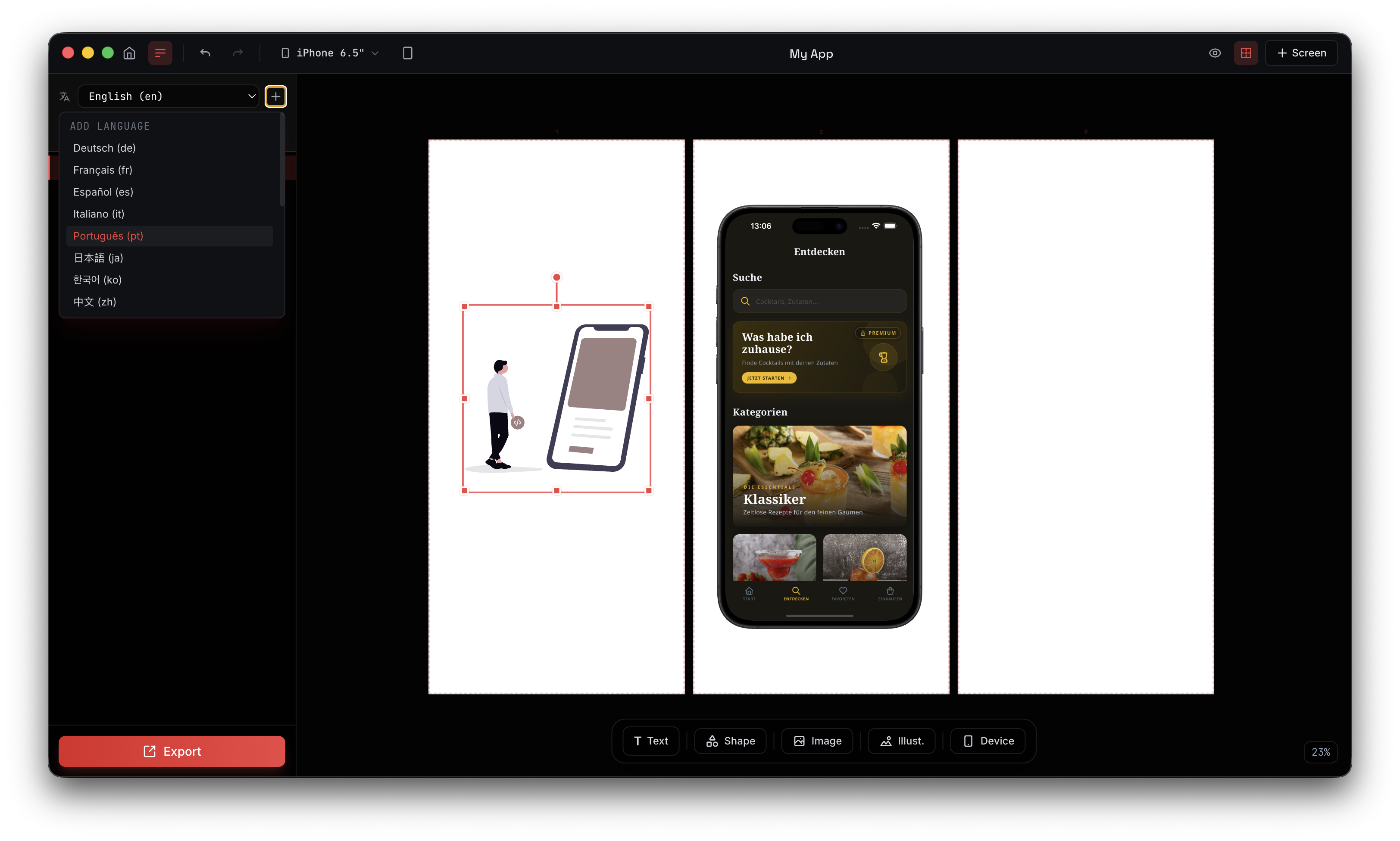
Step 2: Add languages
Open the language panel in Lomio and add the languages you want to support. Lomio supports 20+ languages including:
English, German, French, Spanish, Italian, Portuguese, Japanese, Korean, Chinese, Arabic, Russian, Dutch, Swedish, Turkish, Polish, Danish, Norwegian, Finnish, Thai, and Hindi.
Step 3: Enter translations
For each text element in your design, enter the translation for each language. Lomio shows you which elements still need translations, so you can track your progress.
For device frame elements, you can assign language-specific screenshots. This is useful when your app's UI shows localized content.
Step 4: Preview and adjust
Click any language to preview your screenshots in that language. Check for text overflow, awkward line breaks, or layout issues. German text is typically 30% longer than English, and Japanese characters have different spacing. Preview each language to catch problems.
Step 5: Export all languages
Click export. Lomio generates a complete screenshot set for every language in one go. Each language gets its own folder, ready to upload to App Store Connect.
Translation tips for App Store screenshots
Keep headlines short
This is important in English, but critical for localization. Short headlines are easier to translate and less likely to overflow. Aim for 5 to 7 words maximum.
Good: "Track Every Workout" Bad: "Easily Track and Monitor All Your Daily Workout Sessions"
The short version translates cleanly into almost any language. The long version will break layouts in German, Finnish, and other languages with long compound words.
Use professional translators
Machine translation (Google Translate, DeepL) is acceptable for a first draft but not for your final screenshots. App Store screenshots are marketing material. Awkward phrasing makes your app look unprofessional.
Options for professional translation:
- Freelance translators on platforms like Fiverr or Upwork ($10 to $30 per language for screenshot text)
- Localization services like Gengo or OneSky (more expensive but higher quality)
- Native-speaking friends or users (free, but limited availability)
At minimum, have a native speaker review machine translations before publishing.
Don't just translate, adapt
Some marketing phrases don't work in other languages. "Crush Your Goals" might be motivating in English but sound strange translated literally into Japanese.
Adaptation (also called transcreation) means rewriting the message to have the same emotional impact in the target language, even if the words are different.
Watch for text direction
Arabic and Hebrew are right-to-left (RTL) languages. If you localize into these languages, make sure your screenshot layout works with RTL text direction. Lomio's text elements support RTL alignment.
Common localization mistakes
Mistake 1: Localizing text but not screenshots
If your app shows English text in its UI, your German screenshots will have German headlines around an English app. This looks inconsistent. Either localize your app's UI too, or use screenshots that don't show much in-app text.
Mistake 2: Ignoring text length differences
German words are famously long. "Speed limit" is "Geschwindigkeitsbegrenzung" in German. If your layout doesn't have room for longer text, it will either overflow or get cut off.
Always preview your screenshots in every language before exporting. Lomio makes this easy with one-click language switching.
Mistake 3: Using the same screenshots for all markets
Different markets have different expectations. In Japan, more detailed, information-dense screenshots perform well. In Western markets, clean and minimal designs tend to convert better. Consider adjusting your design approach for major markets.
Mistake 4: Forgetting to update translations
When you update your English screenshots, don't forget to update translations too. Outdated translations are worse than no translations because they actively mislead users.
Measuring the impact of localization
After localizing your screenshots, track these metrics in App Store Connect:
- Conversion rate by territory. Compare before and after localization. You should see improvements in localized markets within 2 to 4 weeks.
- Impressions by territory. Localized metadata can also improve search visibility in local markets.
- Download volume by territory. The ultimate metric. More downloads from localized markets means your localization is working.
Frequently asked questions
How many screenshots should I localize? All of them. If you're going to localize, do the full set. Having some screenshots in English and others in German looks inconsistent and unprofessional.
Should I localize my app description too? Yes. Screenshots are the most visible localization, but your app title, subtitle, and description should also be localized for maximum impact.
How often should I update localized screenshots? Whenever your English screenshots change. If your app UI gets a major update, update all languages. Lomio makes this fast because you just swap in new screenshots and re-export.
Does Lomio translate my text automatically? No. Lomio provides the multi-language framework, but you need to enter translations yourself (or paste them from a translation service). This is intentional because machine translation quality varies too much for marketing text.
Start localizing today
Localization is one of the most underused growth levers for apps. While your competitors show English-only screenshots to every market, you can stand out by speaking your users' language.
Download Lomio and set up your first localized screenshot set. The multi-language feature is included in all plans.
For the basics of creating screenshots, check out our step-by-step guide. For tips on making your screenshots convert better, read 5 tips for screenshots that convert.